Are Smart Locks Shabbat Compatible?

This week, Amazon introduced “Amazon Key,” a service that will deliver packages directly into your home. The days of worrying about packages left at your front door will soon be a memory. In fact, with Amazon’s acquisition of Whole Foods, I am now certain we will have Amazon delivering food into our refrigerators in the not-too-distant future. All this will only be possible if you have a smart lock for the Amazon delivery service to use to open your door and enter your home. The question we want to answer is: are smart locks compatible with Shabbat observance?

I have been testing two popular yet very different smart locks. The first is the Schlage Connect, which retails for about $180. It offers a mechanical deadbolt on the inside of the door; a simple turn of the lever locks and unlocks the door. On the outside is an electronic keypad that illuminates when you press the first button. You can create four-, six- or eight-digit numeric password combinations. The lock also supports multiple codes. Create a code for the family, another for the housekeeper and a third for a trusted contractor. The lock can notify you by phone alert or email when specific codes are used. Adding and removing passcodes are simple and can be done either from the lock itself or from the remote Wink app, which I personally prefer.

Schlage ConnectThere is an auto-lock feature that is extremely useful. Each time the lock is opened, whether from the inside mechanical side or the outside electronic side, the lock will automatically close 30 seconds later. This is great for kids (and adults) who enter or exit without remembering to lock the door. It also provides significant peace of mind knowing that the door is always locked. Finally, it alleviates the dreaded need to get out of bed to make sure all the doors are locked. For me, this is a priceless feature. However, when exiting and re-entering the house for slightly longer than 30 seconds—say, to take out the garbage—you may find yourself locked out. While I will often rush and try to beat the clock or leave the door open a crack, the worst-case scenario is that you must re-enter a passcode. You can temporarily turn off the auto-lock feature by entering the passcode and then quickly closing and re-opening the lock. This will leave the lock opened and waiting indefinitely for you to return from taking out the garbage. As soon as you return and manually close the lock from the inside, the auto-lock feature will automatically re-engage for the next time it is opened. While the lock comes with traditional keys, part of the allure of a smart lock is not having to carry any house keys.

Smart locks have an obvious shortcoming. Since most residential doors do not have a power source, smart locks need batteries. I use rechargeable batteries and keep a spare set handy so they can easily be swapped. While some may worry about being locked out of their home if the battery dies, it would take negligence on the user’s part for this scenario to unfold (unless there is a defect). The locks are also “smart” enough to notify you by email or phone when your batteries are low, providing ample time to replace them before completely losing power.

The attentive reader may have noticed several potential issues with Shabbat. Clearly, using the illuminating touchpad would be an issue on Shabbat. However, even if opening the lock from the mechanical lever on the inside, you may have an issue with Shabbat. The auto-lock feature triggers the 30-second timer mentioned above. Once you leave the house, the door will electronically lock 30 seconds later. Even if you are leaving only briefly and return home before the auto-lock is activated, triggering the timer itself may be an issue. While you can certainly turn off the auto-lock feature completely (not the temporary method listed earlier) every Friday and then back on after Shabbat, this is a major inconvenience. A Shabbat-mode feature would certainly be a game changer for the shomer Shabbat consumer.

Finally, even if you choose not to use the auto-lock feature, there may be an over-arching Shabbat issue. Every lock and unlock event, even if using the mechanical lever, is logged. Through the Wink app, you can see a detailed log that the lock sends every time it is opened or closed. Apparently, even with the auto-lock feature completely disabled, every time you open or close the lock you are sending a signal. This log may not be useful or even noticeable in most cases. There is no obvious light and everything about the activity of turning a mechanical lock seems permissible…except for the log. Perhaps for security there may be room for leniency, or perhaps it may be like passing a motion detector where there is no benefit to you. Please ask your rabbi. If this is a concern, the best technical solution I can provide is to take advantage of the lock’s shortcoming and sever the battery connection before Shabbat. On the Schlage lock this is easily accomplished without having to actually remove the batteries.

Wink Log

Even if you choose not to have this lock on a door you frequent on Shabbat, you can still find it useful in other applications. I have it on my entrance from the garage to the house since I don’t go to the garage on Shabbat. You may have other doors that are used primarily not on Shabbat, or you may want to designate a specific door as the Shabbat door and use this lock on other doors. Finally, you could add this as a second lock to a door for the added convenience and use a traditional lock on Shabbat and only use the smart lock during the rest of the week.

What about the other smart lock I mentioned at the beginning? Does it solve all these problems? I will keep that under lock and key until next time…

Lighting Automation for Shabbos and Yom Tov

The landscape of home automation platforms controlling lights and other home devices has shifted from high-end professionally installed systems to consumer-driven do-it-yourself (DIY) systems. These new DIY smart home devices achieve and often exceed the functionality of their counterparts at a fraction of the price. They are also easy to implement on both a small and large scale. Unlike the professionally installed systems, you don’t have to commit thousands of dollars implementing a whole home system. You can simply begin with a single switch and look to expand as you see fit.

The first question one needs to ask is: Which HUB and corresponding app do you want to use as the nucleus or backbone of your smart home? Your HUB will act as a communication bridge between your WiFi network and all your connected devices. While you may be able to avoid a hub in some cases, as you connect more devices, the HUB becomes critical in integrating them into a single platform.  Additionally, for Shabbos implementation a HUB is currently recommended.  For this article, we will review the Wink Hub 2 ($99.00 at Wink.com). I will expand on the Shabbos implementation first and then go back and fill in some of the other product choices and rationales.Wink Hub 2-Lifestyle-7

The free Wink app that is available for mobile devices allows you to easily create detailed schedules. You can create a “Shabbos Night On” schedule that turns on the desired lights for Friday night and then create another “Shabbos Night Off” schedule to close them when you expect your meal to end, etc. The scheduler always knows what time Shabbos is, even after Daylight Savings Time adjustments, since it is based on sunset and the app knows your location. You simply need to set it once and it is calibrated forever.

It would be ideal for the app to have a “Yom Tov” option where it simply knows the days of the chagim. This is the first area the Wink HUB falls short of addressing the needs of the shomer Shabbos consumer. For now, the pretty simple workaround is to go into the app the week of Yom Tov and schedule your “Shabbos Night” schedule for the specific nights of Yom Tov as well. For example, this year Succos fell out on out on Monday and Tuesday in the diaspora. Instead of setting the schedule for just Friday night, update the scheduler to take effect Sunday, Monday and Friday. The key is to remember to undo the days of Yom Tov after the last days of the Chag. While I would love to see a more automated Yom Tov option, this deficiency should not deter anyone from considering this solution.  I will review the Samsung SmartThings App a a later time.  While Smartthings potentially has more Yom Tov options, the App itself is more complicated which is one of the reasons I choose Wink.

Of course, outside of Shabbos, these schedules are also used to turn off all the house lights in the evening and turn on the outside lights at dusk. My children’s bedroom lights are scheduled to go off after they leave to school even if they forget to turn them off (kids, you know who you are). One can also “group” lights into rooms, floors, outdoor or other categories so you can simply turn on or off a whole group in a single command.

There are also two services new to the Wink application. HomesitterTM is a service that will make it look like you are home even when you are away by opening and closing lights in a natural (not random) pattern. If you are away for a Shabbos, this may be viewed as a halachic problem. MoonLightTM is another service that is designed to turn lights on and off between dusk and dawn, which is just a simpler version of the scheduler. There are also some great integrations with smart locks that we will save for another time.

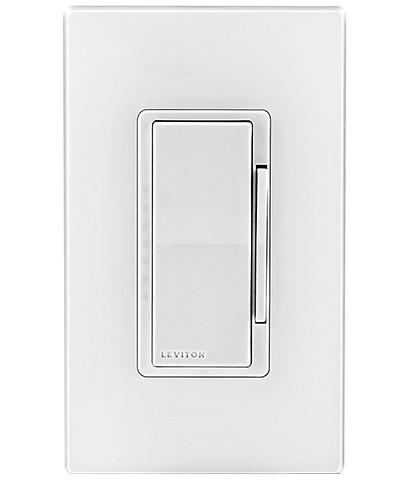
The HUB, however, is just the controller, and you still need to purchase the individual switches. Wink provides an ever-growing list of compatible products that you can control on its platform. For lights, unless your wiring is old or you are just looking to for a single bulb on a lamp, I would recommend smart switches over individual smart bulbs, since bulbs eventually need replacements. Having a single switch cover multiple bulbs is often more cost-effective and practical. I use the Leviton Decora ZWave + Smart In-Wall Switch or Smart Dimmer. The Zwave is so that you are not reliant on WiFi for schedules and the dimmer is for applications where you want to control not only the on/off state but also the brightness of the light. You will need to make sure your bulbs are dim-able as fluorescent applications, and many LED bulbs are incompatible with dimmers. For three- and four-way switch applications, for instances where more than one switch controls the same light (such as at the top and bottom of steps), a “compatible” switch will be necessary. These applications often require an experienced electrician to install them correctly. These switches will, of course, look and act as normal switches and turn on and off your light with a touch. I particularly like these Leviton switches for not having an on/off physical state, so even three-way switches never seem like they are installed backward with the switch rocker in the up position while the light is in fact off. For users of electric hot plates, hot water percolators or pressure cookers, a Leviton smart plug can easily be inserted into the outlet and programmed to go off at the desired time, adding an extra layer of safety.  I will also recommend this later for Amazon Echo applications.

Liviton Dimmer

Before you can add schedules for your switches you will need to “pair” the switches with your hub. In my experience, this was not always as easy as it should be. The good news is that Wink provides an excellent customer service experience with the availability of a live and knowledgeable customer support line.

All in all, I would give the Wink high marks as the app is simple, flexible and constantly improving. The myriad of products that it pairs with is ever-expanding and I look forward to reviewing several in upcoming articles. If Wink were to make a little more effort toward shomer Shabbos needs, I would say they are the preferred system. For now, I simply say they are a strong choice in a competitive landscape. However, once you implement a Shabbos smart home, you may wonder how you ever lived without it.

Intro – Home Automation for The Shomer Shabbos Consumer

The number of ho­me automation products that offer to control our homes is ever expanding. From bulbs to switches, thermostats to appliances and locks to irrigation systems, the myriad products available continues to explode. In this new monthly article, I will review these products, their functionality and services through the unique lens of a shomer Shabbos consumer, and explore the intersection of tradition and cutting-edge home technology. Welcome to the Internet of Things (IoT) for the observant home.

The appliance market was early to recognize the need for specialized technology and functionality for the Shabbos observant home. Shabbat-mode refrigerators/freezers, ovens and warming drawers have all become commonplace in the appliance market. Star-K has created a certification process where they approve specific models that adhere to their standards and provide their trademarked Star-K certification that one would previously only associate with kosher food products. Recently, my family opted for a warming drawer that had a Star-K certification rather than a significantly less expensive model that had a Shabbat mode but was not certified. The non-Jewish but knowledgeable sales person described the uncertified model to us as “problematic” in the traditional halachic sense. Manufacturers have recognized the buying power of the observant home and have invested in the technologies that accommodate Jewish traditions. Consumers, in turn, have rewarded these manufacturers by purchasing these often higher-priced items. The objective of this series is to create a forum for observant consumers of these new automation products as well as to raise the awareness of the manufacturers to both the needs and the purchasing power of the Shabbos-observant consumer.

One can argue that shomer Shabbos families were the early pioneers of home automation. Many of us grew up with timers decades ago. Having timers for light switches or in-wall air conditioners was common for most of us. For me, part of the Erev Shabbos to-do list always involved programming these switches. One of the challenges faced was re-setting the timer each week as Shabbos times changed. On the first Shabbos after daylight saving time it was rare for our timers to be in sync and we often ate in the dark for at least an extra hour. Each of these switches was also completely independent so changes needed to be made individually for each switch. This was a time-consuming task with a less-than-easy interface. Because of these challenges, many homes limited the number of timers they would use. Instead of having a timer in a bathroom one might opt for a night light, etc.

Newly available home automation technology addresses many of these limitations and offers new and improved functionality at ever-improving price points. The shomer Shabbos market is therefore ripe for home automation. At the same time, many manufacturers are building functionalities that are not easily compatible with observance. Work-arounds or modifications will need to be implemented to make them suitable for the observant home. We will explore these implementations and workarounds each month. I look forward to my first review of a home lighting automation implementation for Shabbos and Yom Tov. Please feel free to submit feedback and questions to TribeTechReview@gmail.com and follow TribeTechReview on LinkedIn, Facebook and Twitter.